Wednesday, December 6, 2023

A.Y. 2024-25 Data Mining (Computer Science and Engineering)

Student's Lecture Notes for University Examinations for quick reference.

Regulation: R18 

Subject: Data Mining  Syllabus

Descriptive Question Bank

Objective Question Bank


Unit-1 : 

Introduction to Data Mining Notes Click Here

Data Preprocessing  Hand Written Note Click Here

Data Mining Unit-1 Important Question and AnswerClick Here

Unit-1 ppt Click Here


Unit-2: 


Notes Click Here

Unit-1 ppt Part-1 Click Here

 Unit-2 ppt Part-2 Click Here

FP-Growth ppt Click Here

Question and Answers Click Here


Unit-3

Notes: Click Here

Classification and Prediction ppt Click Here

Decision tree Classification ppt Click Here

Lazy Learner and Rule Based Classification ppt Click Here

Question and Answers Click Here


Unit-4 

Notes: Click Here

Clustering and its Applications- Hierarchical Clustering ppt Click Here

Density Based Clustering ppt Click Here

Partitioning Clustering ppt Click Here

Question and Answers Click Here


Unit-5

unit-5 ppts:  Click Here

Time Series Mining and Sequential Pattern Mining ppt Click Here

Spatial Data Mining ppt Click Here

Text Mining  Click Here

Multimedia Data Mining  Click Here

Question and Answers Click Here


x


Tuesday, September 12, 2023

Python Programming


JNTUH Python Programming(Common to EEE, Mechanical, Civil) Syllabus: PDF


Question bank: Download


Unit-1 Material Find Here


Material : Download HERE


Handwritten Notes: Click Here


PPT: Find Here


Unit-2 Material Find Here

Material : Download HERE


PPT: Find Here


Unit-3 Material Find Here

Material : Download HERE


PPT: Find Here


Unit-4 Material Find Here

Material : Download HERE


PPT: Find Here


Unit-5 Material Find Here

Material : Download HERE


PPT: Find  Here

Monday, May 8, 2023

Write a Java program that simulates a traffic light. The program lets the user select one of three lights: red, yellow, or green with radio buttons. On selecting a button, an appropriate message with “Stop” or “Ready” or “Go” should appear above the buttons in selected color. Initially, there is no message shown.

 import java.awt.Color;

import java.awt.*;
import java.awt.event.ItemEvent;
import java.awt.event.ItemListener;

import javax.swing.*;

class App extends JFrame implements ItemListener{
	JFrame actualWindow;
	JPanel messageContainer, lightsContainer;
	JLabel message;
	ButtonGroup btn_group;
	JRadioButton rb_red, rb_yellow, rb_green;
	
	App() {
		Font myFont = new Font("Verdana",Font.BOLD, 50);
		actualWindow = new JFrame("Traffic Lights");
		messageContainer = new JPanel();
		lightsContainer = new JPanel();
		message = new JLabel("");
		btn_group = new ButtonGroup();
		rb_red = new JRadioButton("Red");
		rb_yellow = new JRadioButton("Yellow");
		rb_green = new JRadioButton("Green");
		
		actualWindow.setLayout(new GridLayout(2, 1));
		
		message.setFont(myFont);
		rb_red.setForeground(Color.RED);
		rb_yellow.setForeground(Color.YELLOW);
		rb_green.setForeground(Color.GREEN);
		
		btn_group.add(rb_red);
		btn_group.add(rb_yellow);
		btn_group.add(rb_green);
		
		rb_red.addItemListener(this);
		rb_yellow.addItemListener(this);
		rb_green.addItemListener(this);
		
		messageContainer.add(message);
		lightsContainer.add(rb_red);
		lightsContainer.add(rb_yellow);
		lightsContainer.add(rb_green);
		
		actualWindow.add(messageContainer);
		actualWindow.add(lightsContainer);
				
		actualWindow.setSize(300, 200);
		actualWindow.setVisible(true);
	}

	@Override
	public void itemStateChanged(ItemEvent ie) {
		JRadioButton selected = (JRadioButton) ie.getSource();
		String textOnButton = selected.getText();
		if(textOnButton.equals("Red")) {
			message.setForeground(Color.RED);
			message.setText("STOP");
		} else if(textOnButton.equals("Yellow")) {
			message.setForeground(Color.YELLOW);
			message.setText("READY");
		} else {
			message.setForeground(Color.GREEN);
			message.setText("GO");
		}
	}
}
public class TrafficLight {
	public static void main(String[] args) {
		new App();
	}
}


Write a Java program that handles all mouse events and shows the event name at the center of the window when a mouse event is fired .

Program Code:

import javax.swing.event.*;

import java.awt.event.*;

import java.awt.*;

import javax.swing.JApplet;

public class mouseevnts extends JApplet implements MouseListener

{

private int x,y;

private String event;

public void init()

{

setLayout(new FlowLayout());

x=-1;

addMouseListener(this);

}

public void paint(Graphics g)

{

super.paint(g);

g.drawRect(0,0,getWidth(),getHeight());

if(x!=1)

{

g.drawString("Mouseevent is"+event+"("+x+","+y+")", 10,50);

}

}

public void mousePressed(MouseEvent e)

{

x=e.getX();

y=e.getY();

event="pressed";

repaint();

}

public void mouseClicked(MouseEvent e)

{

x=e.getX();

y=e.getY();

event="clicked";

repaint();

}

public void mouseReleased(MouseEvent e)

{

x=e.getX();

y=e.getY();

event="Reeleased";

repaint();

}

public void mouseExited(MouseEvent e)

{

x=e.getX();

y=e.getY();

event="Exited";

repaint();

}

public void mouseEntered(MouseEvent e)

{

x=e.getX();

y=e.getY();

event="Entered";

repaint();

}

}


Tuesday, April 18, 2023

3. a) Develop an applet in Java that displays a simple message. b) Develop an applet in Java that receives an integer in one text field, and computes its factorial Value and returns it in another text field, when the button named “Compute” is clicked.

 a)      Develop an applet in Java that displays a simple message.

Program:

import java.awt.*;

import java.applet.Applet;

/* <applet code="SimpleApplet" width=300 height=50> </applet> */

public class SimpleApplet extends Applet

{

 public void paint(Graphics g)

 {

 g.drawString ("A Simple Applet",100, 100);

 }

}


Execution:

C:\Users\vits\Desktop\java> javac  SimpleApplet.java


C:\Users\vits\Desktop\java>appletviewer  SimpleApplet.java


Output:


b)      Develop an applet in Java that receives an integer in one text field, and computes its factorial Value and returns it in another text field, when the button named “Compute” is clicked.

Program:

import java.awt.*;

import java.awt.event.*;

import java.applet.Applet;

/* <applet code="Fact" width=300 height=50> </applet> */

public class Fact extends Applet implements ActionListener

{

Label l1,l2; TextField t1,t2; Button b1;

public void init(){

l1=new Label("enter the value"); add(l1);

t1=new TextField(10); add(t1);

b1=new Button("Factorial"); add(b1); b1.addActionListener(this);

l2=new Label("Factorial of given no is"); add(l2);

t2=new TextField(10); add(t2);

}

public void actionPerformed(ActionEvent e)

{

if(e.getSource()==b1)

{

int fact=fact(Integer.parseInt(t1.getText())); t2.setText(String.valueOf(fact));

}

}

int  fact(int f)

{

int  s=0;

if(f==0)

 return 1;

else

return  f*fact(f-1);

}

}


Execution:

C:\Users\vits\Desktop\java>javac   Fact.java


C:\Users\vits\Desktop\java>appletviewer   Fact.java


Output:


Monday, April 17, 2023

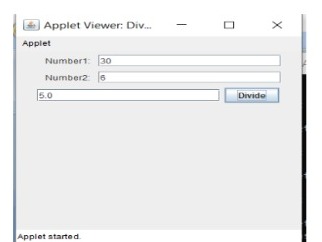
Experiment No: 4 Write a Java program that creates a user interface to perform integer divisions. The user enters two numbers in the text fields, Num1 and Num2. The division of Num1 and Num 2 is displayed in the Result field when the Divide button is clicked. If Num1 or Num2 were not an integer, the program would throw a Number Format Exception. If Num2 were Zero, the program would throw an Arithmetic Exception. Display the exception in a message dialog box.

 Program:

import java.awt.*;

import java.awt.event.*;


import javax.swing.*;

/*

&lt;applet code=&quot;DivApplet&quot; width=350 height=300&gt;

&lt;/applet&gt;

*/

public class DivApplet extends JApplet implements ActionListener{

JTextField number1,number2,result;

JButton divide;

public void init(){

try

{

SwingUtilities.invokeAndWait(

new Runnable() {

public void run() {

makeGUI();

}

});

}

catch (Exception exc)

{

System.out.println(&quot;Can&#39;t create because of &quot; + exc);

}

}

private void makeGUI()

{

setLayout(new FlowLayout());

Label number1p = new Label(&quot;Number1: &quot;,Label.RIGHT);

Label number2p = new Label(&quot;Number2: &quot;,Label.RIGHT);

number1= new JTextField(20);

number2 = new JTextField(20);

result = new JTextField(20);

divide = new JButton(&quot;Divide&quot;);

add(number1p);

add(number1);

add(number2p);


add(number2);

add(result);

add(divide);

divide.addActionListener(this);

}

public void actionPerformed(ActionEvent e){

String snumber1,snumber2;

snumber1 = number1.getText();

snumber2 = number2.getText();

try{

int number1 = Integer.parseInt(snumber1);

int number2 = Integer.parseInt(snumber2);

if(number2==0)

JOptionPane.showMessageDialog(null, &quot;Division by zero not defined.&quot;);

else{

double r = (double)number1/number2;

result.setText(((Double)r).toString());

}

}

catch(NumberFormatException ne)

{

JOptionPane.showMessageDialog(null,&quot;Enter a number&quot;);

}

}

}

Execution:

C:\Users\vits\Desktop\java&gt;javac DivApplet.java

C:\Users\vits\Desktop\java&gt;appletviewer DivApplet.java

Output:


Monday, April 10, 2023

Experiment No: 5 Aim: Write a Java program that implements a multi-thread application that has three threads. First thread generates random integer every 1 second and if the value is even, second thread computes the square of the number and prints. If the value is odd, the third thread will print the value of cube of the number.


Program:


import java.util.Random;

class Square extends Thread

{

 int x;

 Square(int n)

 {

 x = n;

 }

 public void run()

 {

 int sqr = x * x;

 System.out.println("Square of " + x + " = " + sqr );

 }

}

class Cube extends Thread

{

 int x;

 Cube(int n)

 {x = n;

 }

 public void run()

 {

 int cub = x * x * x;

 System.out.println("Cube of " + x + " = " + cub );

 }

}

class Number extends Thread

{

 public void run()

 {

 Random random = new Random();

 for(int i =0; i<5; i++)

 {

 int randomInteger = random.nextInt(100);


 System.out.println("Random Integer generated : " + randomInteger);

 Square s = new Square(randomInteger);

 s.start();

 Cube c = new Cube(randomInteger);

 c.start();

 try

{

 Thread.sleep(1000);

}

catch (InterruptedException ex)

{

 System.out.println(ex);

}

 }

 }

}

public class Thr

{

 public static void main(String args[])

 {

 Number n = new Number();

 n.start();

 }

}

Output:


C:\Users\vits\Desktop\java>javac Thr.java


C:\Users\vits\Desktop\java>java Thr

Random Integer generated : 61

Square of 61 = 3721

Cube of 61 = 226981

Random Integer generated : 19

Square of 19 = 361

Cube of 19 = 6859

Random Integer generated : 13

Square of 13 = 169

Cube of 13 = 2197

Random Integer generated : 5

Square of 5 = 25

Cube of 5 = 125

Random Integer generated : 94

Square of 94 = 8836

Cube of 94 = 830584

Monday, March 27, 2023

Write a Java program for the following: i) Create a doubly linked list of elements. ii) Display the contents of the list after deletion.

 import java.lang.*;


public class DoublyLinkedList

 {  

        class Node

        {  

        int data;  

        Node previous;  

        Node next;  

          public Node(int data) 

        {  

                this.data = data;  

        }  

    }  

     Node head, tail = null;  

      public void addNode(int data) 

   {  

        Node newNode = new Node(data);  

          if(head == null) 

            {  

                 head = tail = newNode;  

                   head.previous = null;  

                tail.next = null;  

        }  

        else

        {  

              tail.next = newNode;  

              newNode.previous = tail;  

              tail = newNode;  

              tail.next = null;  

        }  

    }  


    public void display() 

    {  

        Node current = head;  

        if(head == null) 

        {  

            System.out.println("List is empty");  

            return;  

        }  

        System.out.println("Nodes of doubly linked list: ");  

        while(current != null) 

        {  

             System.out.print(current.data + " ");  

            current = current.next;  

        }  

    }  


    public static void main(String[] args) 

    {  


        DoublyLinkedList dList = new DoublyLinkedList();  

        dList.addNode(1);  

        dList.addNode(2);  

        dList.addNode(3);  

        dList.addNode(4);  

        dList.addNode(5);  


        dList.display();  

    }  

}  


Output:

Nodes of doubly linked list: 

1 2 3 4 5 


Saturday, December 17, 2022

Data Mining R18

R18 Data Mining Lecture Notes for University Examinations for quick reference.

Unit-1 : Notes Click Here

Unit-1 : Data Preprocessing Click Here

Data Mining Unit-1 Important Question and AnswerClick Here

Introduction to Data Mining ppt Click Here

Data Discretization and Concept Hierarchy Click Here

Unit-2: Notes Click Here

Association Rule Mining ppt Click Here

Apriory Algorithm Click Here

Unit-3 : Notes Click Here

Lazy Learner and Rule Based Learning Click Here

Unit-4 : Notes Click Here

Hierarchal Clustering ppt Click Here

Partitioning Clustering ppt Click Here

Grid Based Clustering ppt Click Here

Density Based Clustering ppt Click Here

Unit-5

ppt on Data Streaming, Mining Time Series Data, Mining Sequential Click Here

ppt on Text Mining Click Here

ppt on Mining Spatial Data, Multimedia Data Click Here


Wednesday, June 1, 2022

VR23 Object Oriented Programming Though Java Notes

Object Oriented Programming Though Java Syllabus(VR23): Click Here

Unit-1 : 1st Part Notes Click Here

Unit-1 : 2nd Part Notes Click Here

Unit- 2 : Packages & Interfaces Notes Available

Unit-2 : Java.io Package  See Here

Unit-3 Hand written Notes   Click Here

Unit-4 Collection Framework PPT Download 

         Java.io PPT Download

       JDBC Connectivity PPT Downlaod 


Monday, May 23, 2022

Write a Java program to create an abstract class named Shape that contains two integers and an  empty method named print Area (). Provide three classes named Rectangle, Triangle, and Circle  such that each one of the classes extends the class Shape. Each one of the classes contains only  the method print Area () that prints the area of the given shape.

import java.util.*;

abstract class Shape {
	int length, breadth, radius;

	Scanner input = new Scanner(System.in);

	abstract void printArea();

}

class Rectangle extends Shape {
	void printArea() 
{
		
System.out.println("*** Finding the Area of Rectangle ***");
System.out.print("Enter length and breadth: ");
length = input.nextInt();
breadth = input.nextInt();
System.out.println("The area of Rectangle is: " + length * breadth);
	}
}

class Triangle extends Shape 
{
	void printArea()
 {
       System.out.println("\n*** Finding the Area of Triangle ***");
    System.out.print("Enter Base And Height: ");
    length = input.nextInt();
    breadth = input.nextInt();
 
System.out.println("The area of Rectangle is: " + (length * breadth) / 2);
  }
}

class Cricle extends Shape
 {
    void printArea() 
    {
	System.out.println("\n*** Finding the Area of Cricle ***");
	System.out.print("Enter Radius: ");
	radius = input.nextInt();

System.out.println("The area of Rectangle is: " + 3.14f * radius * radius);
    }
}

public class AbstractClassExample
 {
public static void main(String[] args)
 {
   Rectangle rec = new Rectangle();
   rec.printArea();

   Triangle tri = new Triangle();
   tri.printArea();
 		
   Cricle cri = new Cricle();
    cri.printArea();
}
}

A simple Java program to find the inverse of a given matrix

  import java.util.Scanner; public class MatrixInverse { public static void main (String[] args) { Scanner scanner =...